Thursday, April 27, 2006

Coming of Age: an introduction to the new world wide web

Coming of Age: an introduction to the new world wide web
This book - Coming of Age (.pdf - 1.9MB) - is a nice UK introduction to Web 2.0 for individuals, teachers, school and Local Authority managers (Superintendents and Administrators), school libraries, Professional Development coordinators, students and parents.
The book provides a set of stories, describing the ways in which Web 2.0 technology can be used in schools, particularly as a way of supporting social, collaborative learning, and a more individualised curriculum.
I downloaded it and have read through much of it and though I know there is some really good information out there on the web, it is hard to find such a comprehensive listing of ideas and information from professionals in the field actually using and training on this stuff. If you get the chance, I very much recommend taking a look for yourself - go ahead - don't cost nothin'...

Labels: , , , , ,

Monday, April 24, 2006

Report: AHEAD E-Text Institute #3

AHEAD E-Text Institute participants [and Ron Stewart groupies] get excited about the training ... or maybe it was just the abundance of coffee and pastries The E-Text Institute sponsored by the AHEAD E-Text Solutions Group went extremely well. Ron Stewart was, as always, a crowd favorite and he covered the Policies and Procedures portion of the program on Thursday. Most of the two-dozen attendees were aware of what he discussed and the questions posed were right on the money - serving to enhance the presentation. This being my third institute and having seen Ron present before, I could tell he was very comfortable as he kept deviating from the slides but still managed to bring it in on time. Primary topics included:

  • What E-text is and is not [file formats]
  • Who uses E-text and why
  • Where does E-text come from (and how)
  • The Laws around E-text [copyright, ADA, 504, 508, various State regulations, Chafee]
  • Relevant OCR cases and implementation [what they mean to us]
  • Publisher [perspective, rights, responsibilities]
  • Policy development and implementation
  • Common problems and solutions [not quite 'Best Practices' but in that direction]

One portion of the presentation that has seen growth over the three institutes is the Publisher Perspective. The advent of NIMAS and movement of E-text production into the accommodation mainstream - as well as numerous advances in the ease of production - have gained the attention of the publishers. They are beginning to take a serious look at the commercial viability of E-text along with a broader appreciation of their rights (and responsibilities). In this segment Ron covered:

With rights, of course, comes responsibilities. Ron covered the basics of who is responsible for what [students, faculty, DSS, publishers, institutions, bookstores, etc.] which was followed by policy issues [the need, development, establishing, parties involved, etc.]. Also included was links to and information about various resources - most of which is available on the expanding AHEAD E-Text Solutions Group site.

I sat way in the back so as not to distract [Ron barely picked on me at all] and furiously took fresh notes for when I will be presenting similar information at Landmark College in June. This, however, was the best institute yet and has been streamlined nicely. Ron also told those assembled that by this time next year there would be one training each month rotating around the country and New England would certainly be included. he also alluded to an idea that the Policy and Procedures piece would be expanded to two days as would the Production portion. This way each half could be geared towards separate crowds - the former for administrators and the latter for technologists - with appropriate overlap.

Friday started out very well - more coffee and danish for the masses [Erin reminded us to be careful as our gotten gains could turn ill should anyone spill on a keyboard]. Ron started with an extremely slimmed down version of the Production slides that covered the bare essentials of terminology, scanning with Abbyy Fine Reader, E-Text and Digital File formats, and the parts of a DAISY Talking Book.

The eager masses in the Babson College computer training lab yearning to create DTB and be free of analog tapes forever!I started out my portion by having the class open the sample DAISY book folder on their workstations and going over the parts that comprise a DTB - the various files and formats within the book folder. It is rather like discussing the various files that make up a fully functional website - you've got html, .txt, .mp3, smil, ncc and more. This was followed by stick-time with Dolphin EaseReader. After all - how can folks be expected to build DAISY books if they don't know what they're made of and how they work.

Following lunch in a Babson Dining Hall we set our minds to producing DAISY books using the training module I am currently developing for Boston University. [NOTE: please feel free to take a look at these materials but keep in mind they are a work in progress. They will soon be expanded and moved to a more permanent location.] Dann gets into the production piece with a step-by-step guide still very much in development. A brief overview of each portion of the process yielded great feedback from Ron and questions from the participants. I did this in order to head off the inevitable looking-ahead that tends to screw-up those who are supposed to be following along step-by-step and to give the class a feel for the overall process.

It was also here that Ron and I discovered areas where we agree to disagree. My basic process involves removing all pictures and other graphics and replacing them with the captions form the book and a notice for user to refer to their hard copy. The rationale being that in most cases students will own a copy of the book themselves and be able to access such references. The LD, MI, and most LV students can eye-ball the materials and the Blind/LV (severe) students tend to prefer quality captions and descriptions. We also remove these items because of the time and labor involved in building them into the finished DAISY book. Ron's take on this is that publishers will argue that under copyright we must maintain as much of the integrity of the textbook as possible - regardless of procedural constraints. We understand each others argument and, in fact, as my staff continually refines our process we are discovering better and faster techniques which will allow us to include items such as graphics and footnotes and still get the books to the end-users in a reasonable amount of time.

The Boston University training module is broken into five sections [with additional segments in the works]:

  1. From .pdf to .doc - we start out our process by scanning into .pdf format. This gives us a digital master to work from. Using Optical Character Recognition (OCR) we break the large single .pdf into more manageable chunks [typically book chapters].
  2. Editing of .doc files - we do not "edit" so much as clean up. No OCR is perfect and we need to pretty much strip out the formatting so that they will best fit into the DAISY production software. We also make certain that the text in the digital files exactly matches the text in the hard copy.
  3. Section three has multiple parts and takes users through the Dolphin EasePublisher production software.
  4. Here we do quality control and make certain the various files are named correctly and that all is safe and sound.
  5. Finally there is information about how we go about delivering the finished product to the student end-user.

For this training we used the files from a book I had done at BU this past semester and concentrated on only a few pages of the first chapter. Out of a dozen-and-a-half attendees actively following along with my instructions [some chose to sit and watch], two-thirds were able to produce a working finished product. Considering this was the first time I had actually used this training module - and given the number of errors I found in the process during the workshop - and not to mention Ron being in the same room - I was delighted with the results.

Ron demonstrates to Dann the proper technique for encouraging staff discipline in the production environment - the key is to not leave any marks!
We followed the hands-on piece with a quick look at Dolphin Producer - the barebones DAISY production tool that works with Microsoft Word. Overall the institute was a fantastic experience and I cannot thank Ron Stewart enough for allowing me the opportunity to take part. And I only got on Ron's nerves a little bit.

Labels: , ,

Sunday, April 23, 2006

Report: Making Knowledge Accessible in the Digital Age

University Teaching and the Challenge of Universal Design: Making Knowledge Accessible in the Digital Age
Busy busy week and finally some time to catch up on events - reflection will come later and typically occurs during my daily commute when the caffeine kicks in. Tuesday was the David Rose, Thomas Hehir, Ron Stewart panel presentation and discussion University Teaching and the Challenge of Universal Design: Making Knowledge Accessible in the Digital Age.

Video and audio recording was in place and as soon as I have information on where (and if) the presentation is available on-line I will be posting it here. Eveyone in attendance recieved a copy of The Universally Designed Classroom: Accessible Curriculum and Digital Technologies - the latest work edited by Rose, Meyer, and Hitchcock of CAST. Thanks to the LD Access Foundation which donated the funds for the book give away and to AHEAD contributing for the reception alongside LD Access.
Eileen Berger, ATHEN Treasurer and Assistant Director for Disability Services at the Harvard Graduate School of Education, introduced the topic and speakers
Eileen Berger, ATHEN Treasurer and Assistant Director of the Office of Student affairs at Harvard Graduate School of Education [and Head of Access and Disability Services] introduced the topic and speakers. I should stop here for a moment and explain that this seminar could easily have been a full day (or more). In fact, all three speakers were asked about their availability to return and present again. All three agreed and planning is apparently underway.

Over the first hour, David Rose squeezed out a synopsis of his Harvard Graduate course on Universal Design. He covered the three basic tenants of Universal Design:

  1. Use multiple means for representation - "Disability is not inherent in the individual as much as it is about the individuals interaction with the environment."
  2. Use multiple means for action and expression.
  3. Use multiple means for engagement - seek what motivates and engages students.

Over the first hour, David Rose squeezed out a synopsis of his Harvard Graduate course on Universal DesignAs an example he used an unexpected source - a GPS navigation program from Hertz Rental Car called Neverlost. Professor Rose does a lot of traveling for speaking engagements and uses this system everytime he rents a car. He discussed the system in somewhat whistful terms wondering what it would be like if education followed similar principles. For example:

  • Neverlost asks the user (learner) "Where are we now?" and sets an individualized starting point.
  • The system recognizes there is more than one way to get from point A to point B.
  • Recalculating routes (learning paths) is effortless and non-judgmental.
  • However, Neverlost is not a curriculum as the user does not "learn" so much as follow a route. It is very linear and rote and drivers come to rely upon the GPS rather than learn about the general area.

Professor Rose also does something interesting in his course, each week he rotationally assigns a handful of students to be the notetaker for the entire class. This individual has the responsibility of compiling the course notes and providing them for classmates. Not only does this free-up most tof the class to focus on discussion - but demonstrates how and what different individuals take notes, share notes, and consider important.

Ron Stewart spoke to how technology is used in the Postsecondary arena and briefly covered the Big-5 with accessibility as an overlay:Ron Stewart [on the right] spoke to how technology is used in the Postsecondary arena

  1. Information Retrieval, Use, and Dissemination
  2. Distance Education
  3. Information Technologies
  4. The Internet and WWW
  5. Covering the cost of accessibility (who pays?)

Ron introduced the audience to one my favorite of his terms - "Ah ... Duh ... Research" which is the act of actually doing research to confirm what we already know. He briefly reviewed the major access related laws (504, 508, ADA, IDEA, Tech-Act, Telecommunications Act) as well as some of the more important OCR cases of late. Asking the question "what is accessibility?" led to a four point answer:

  • Code Based - letter of the law accessibility
  • Access Board policies and procedures - bench marks of accessibility
  • Functional accessibility (common sense and individualized)
  • Universal Design - trying to cover the majority of the bellcurve with the knowledge that we cannot possibly attend to every outlier.

Ron spoke of the need for institutions to perform honest and accurate assessments of accessibility - and warned that unless we plan to act upon the findings we should not bother. Few things irk the OCR more than a school knowing where it needs to address issues and failing to do so [however, it is not recommended you remain ignorant]. Such an assessment includes:

  • both formal and informal inquiry
  • data driven and need driven reviews
  • facilities assessment
  • technology assessment
  • individual assessment
  • references to requirements (federal, state, local, international)

One should also be prepared to plan for implementing changes. In the scope of his remarks Ron focused on access and technology and stated what many of us already know or could easily find out via ah...duh...research and that is "infusing technology into the accommodation paradigm (for disabilities) saves money." And isn't saving money really what it is all about?

Bullet points abounded with Ron. I hope a podcast will be available soon as Ron provides better explanations that I can - but here are three lists to consider:

Promoting Independence

  • Use unmodified technology whenever possible
  • Implement modifications that can be rapidly learned and independently used
  • Implement modifications that are easily transferred to the work environment ouside the academy
  • Implement modifications that are easily generalizable - not domain or content specific

Cost Effectiveness

  • Analyze needs and implement strategically
  • Leverage existing systems
  • Target acquisition needs to meet the higest demands
  • Develop long term strategies based upon assessments
  • Think Ahead! but remain flexible.

How to Lower Costs

  • Use off-the-shelf solutions when and where possible
  • Replace "labor intensive" with "universally applicable"
  • Analyze learning situations and make modifications based on pedagogy
  • Use multipurpose tools where possible

The final speaker was Thomas Hehir, Harvard Professor and OSEP Director during the Clinton Administration. He spoke to the role of education for students with disabilities and the impact on and of public policy and introduced us to the concept of ableismThe final speaker was Thomas Hehir, Harvard Professor and OSEP Director during the Clinton Administration. He spoke to the role of education for students with disabilities and the impact on and of public policy and introduced us to the concept of ableism:

  • Schools often reflect the attitudes and behaviors of the broader society in which disability is devalued and persons with disabilities do not enjoy equality of rights and opportunities.
  • Children and young adults with disabilities need to be allowed to be disabled - need to become comfortable with themselves and their disability - their abilities and limitations and how to accomplish the same as their non-disabled peers albeit in a different manner.
  • Universal Design allows students to access the curriculum as equals - approaching the same materials in different manners and modes.

Defining "disability", according to Professor Hehir, should not come from the standards point-of-view of the non-disabled. Individuals should embrace and understand their personal disability and work with it - not against it. Go with the current and do not try to swim against it (so to speak). Ron Stewart recommends that IT becomes the purveyors of AT. The institution needs to recognize that perhaps it is the curriculum that is disabled and not the students accessing it. Afterwards there was a nice reception with wine an cheese and such. David Rose is my kinda teacher as he gathered up many leftovers for his students that evening.

Afterwards there was a nice reception with wine an cheese and such. David Rose is my kinda teacher as he gathered up many leftovers for his students that evening.

Next up will be a report on the AHEAD E-Text Institute at Babson College.

Some follow-up notes. Apparently getting these three speakers together has its own backstory. According to Eileen Berger:

It was an unusual, and I think, unique convening of these great people for the benefit of the rest of us. When I heard from Erin [Evans of Babson College] a few months ago that Ron was going to be around this past week I called Ron and David about the possibility of a lecture together- David was on it immediately since he had wanted to do this presentation [on Universal Design] at Harvard for a while and Ron was gracious and interested as well. We (LD Access) had brought Ron onto the program at a UPenn conference 2 years ago with David but this time the focus would be on Higher Ed. Tom Hehir was available to give the policy and attitudes perspective/caveats as discussant after the how-to experts presented. It just so happened they were all available at the same time... it was fate!! What an experience to get all that information and know how from their 3 different perspectives in one place.

Labels: , , , ,

Friday, April 21, 2006

PCWorld.com - Will Tablet PCs Replace Textbooks?

I am currently sitting in the Friday morning portion of the AHEAD E-Text Solutions workshop while Ron leads the group through Abbyy Fine Reader and basic scanning techniques. I will be posting notes and pics over the weekend. From the sidelines I am checking my RSS feeds and came across this interesting bit from PCWorld.

Tablets have yet to move into the mainstream, but Bill Gates still believes in the technology.
Martyn Williams, IDG News Service
Friday, April 21, 2006

TOKYO -- The uphill battle that tablet computing continues to face in winning favor with consumers hasn't dampened Bill Gates' enthusiasm for the technology. Microsoft's chairman and chief software architect said Friday that someday tablet PCs will replace textbooks for all students.

'We do see, over time, that the ink input for the tablet and speech input will become as important as the keyboard, not replacing it but equally important.' Gates said at a news conference here. 'In fact, we see a day where every student, instead of their textbooks, will simply have their tablet computer connected up to the wireless Internet,' he said. 'And so the teacher can customize the material, they can quiz the student. That student can have that tablet with them wherever they go and it's actually lighter than the textbooks and more flexible, richer in terms of what it can offer.'

Friday, April 14, 2006

World Wide Web Consortium Opens China Office

Short piece out of Campus Technology:
The World Wide Web Consortium (W3C), a standards-setting organization for Web technology integration, has opened up an office in Beijing to encourage Chinese technology experts to join in the process of developing Web standards. The office will be based at the Advanced Computing Technologies School of Computer Science & Engineering of Beihang University in Beijing. Steve Bratt, chief executive officer of W3C, along with representatives of Chinese industries and research institutes, will inaugurate the office at a ceremony on April 27. W3C officials said they believe it is important that the Web industry in China use international standards and actively participate in developing them. “To achieve its goal for the full potential for the Web, W3C needs Chinese expertise,” said an official from the consortium. “By opening its mainland China office, W3C actively engages the Chinese industrial and academic communities in the development of international Web standards.”

Thursday, April 13, 2006

NIMAS in Maryland

From the listservs - thanks to Robert Martinengo of the ATPC who writes:

There has been some interesting maneuvering in the state of Maryland regarding accessible textbooks. A bill was introduced that would require NIMAS files be provided for college students as well as K-12. However, that language was amended last week and changed to this:
  • AMENDMENT NO. 4
    On pages 4 and 5, strike in their entirety the lines beginning with line 26 on page 4 through line 7 on page 5, inclusive, and substitute:

    "SECTION 2. AND BE IT FURTHER ENACTED, That:
    (1) The Maryland Higher Education Commission and the Maryland Department of Disabilities shall review the research and recommendations developed by the Association of American Publishers’ National Alternative Formats Initiative regarding approaches and technologies to best provide textbooks to postsecondary students with print disabilities.
  • Here is the link to the legislative site: BILL INFO-2006 Regular Session-SB 392
  • Interesting to note that it has been cross-filed with SB 710

ATHEN President Ron Stewart chimed in on the list with the following:

There is a lot of this going on in a lot of states, Georgia, Utah, Maryland, South Dakota are the ones just off the top of my head. We are also seeing proposed four different tiers of legislation, k-12, k-14, CC only, and Postsecondary. As many can tell you bad facts make for bad law, and that is the way things are currently going with this myriad of different state laws, and the NFB proposing a national law that is Chaffee based. Which excludes, at least on the surface, many of your [postsecondary] students.

The Association of American Publishers National Alternative Formats Initiative is their name for their part of the AHEAD E-Text Initiative which I am leading. These changes that are being seen are probably the result of lobbying efforts on the parts of the AAP to have states give us some time to get something done, before we have 50+ different state laws and rules which will result in us ending up in court for a few years before any progress gets made.

AHEAD, and it's E-Text initiative is one of the partners in the AAP effort along with others in the Publishing, Advocacy and Service Provider community. I think it is great that the AAP has chosen to take this step, and hired a top notch person to lead it for them. The AAP effort is not part of the AHEAD effort, but a complimentary and separate initiative on the part of the AAP to develop a workable solution to the challenges of curricular access.

Labels: ,

Wednesday, April 12, 2006

ATHEN meets [infiltrates?] EDUCAUSE

EDUCAUSE, to quote their website, "is a nonprofit association whose mission is to advance higher education by promoting the intelligent use of information technology." They are the leading organization as regards IT in postsecondary education and oversee the '.edu' domain tag. For several years now, AHEAD and ATHEN have made attempts to become more involved with Educause but these attempts have fallen by the wayside either due to indifference or disinterest on the side of Educause. Like much of the world outside of disability services and access technology, it is likely that Educause knows who we are and that what we do is important, but they just cannot figure out how to incorporate us into the framework. If we could just get our professional foot-in-the-door it would definitely elevate access technology from a side-job of Disability Services to an entity of its own right as part of campus IT.

Several inroads have been made over the years, most notably through the presenting and publishing efforts of members Terry Thompson, Sheryl Burgstahler, and Norm Coombs and others. Last month, Educause announced that AT pioneer and technology visionary Ray Kurzweil would be the keynote speaker for the 2006 Annual Conference. Terry Thompson contacted Ray and asked him to consider including access technology and accessibility issues within his address to Educause. In a very positive response, Ray said that he would include accessibility among his remarks. [If you are reading this Ray - 'Thank You'].

Another step was taken recently when Educause created a Community Blog Service open to members. Taking advantage of this opportunity, I have set up a blog in the Educause space and look forward to sharing the best of ATHEN at my blog site. A recent posting advertised the upcoming forum on Making Knowledge Accessible in the Digital Age being sponsored by the Harvard Graduate School of Education. Responses to this post, via eMail and blog comments, have been positive, with one reader asking "Is there any chance of having something like this at the Educause annual conference, where it will be (ahem) "accessible" to more of us?"

I encourage all members of ATHEN whose institutions are members of Educause to seek out your Primary Representative and ask about being listed as a Participating or Subscribing Representative. The resources and professional development opportunities available to registered members are definitely worth the effort - and it also puts you in sight of your home IT as well as on the Educause radar screen.

Monday, April 10, 2006

As trees still fall, Sony reboots the drive for electronic reading - The Boston Globe

By Mark Baard
Boston Globe Business Section
April 10, 2006


Many high-tech companies like to talk about e-ink and e-paper, the technologies they hope will replace books made the old fashioned way. But the next time you tuck into the latest installment in the ''Left Behind' series, it will probably be at the expense of a tree somewhere. E-books are off to a pretty bad start in the United States. Sony Electronics hopes to move the e-book market forward this summer, with a new high-contrast, high brightness, and flicker-free hand-held device called the Reader. The Reader simulates the experience of reading newsprint, with similar page brightness and text resolution. But the black-and-white Reader's big selling points are its storage capacity and portability, said Sony Electronics vice president Ron Hawkins.

The Reader (about the size of a paperback) can store 75 or more e-books. Users can download RSS feeds and other Web content to the device. The Reader will deliver popular titles through its Connect website (
www.connect.com), Sony's alternative to the iTunes Music Store. The content for the Reader will appeal to boomers, as well as younger folks, who prefer pictures with their text, according to Sony. You can read the text from any angle and in direct sunlight, two things you can't do with ordinary hand-held LCD computer displays. And because the Reader's e-ink display material is not back-lit, it cuts down on eyestrain, according to Sony.

Friday, April 07, 2006

Gathering SCORM could transform eLearning

I'm just getting a handle on NIMAS & DAISY and now we have a new acronym - SCORM: Sharable Content Object Reference Model:
An emerging set of standards for ensuring the interoperability, accessibility, and reusability of digital instructional materials will have an enormous impact on eLearning. The standards' creators say they will open the door for educators to share, contribute, and reuse digital learning objects at will, regardless of the content management platform schools might use.
Not to be confused with SCMODS, this XML based standard appears to be the cross-platform access solution many of us have been hoping to see emerge from the chaos that is the Learning Management System industry. Without a doubt, SCORM is real and it's out there - so no smirking at FAQ's such as "How long does it take to make my LMS SCORM Conformant?" and no giggling at White Paper titles such as "How to Efficiently Gather Metadata and Content and Write Your Xml too" [o.k. - Sean can giggle at that one], and by all means, dig out your reading glasses and magnifiers for the handy SCORM Resource Poster [.pdf download].

SCORM is an outgrowth of the Department of Defense education and training efforts as a response to their need for across the board conformity as regards a range of "ilities" - you read that right "ilities" such as interoperability, affordability, durability, reusability and accessibility. It's not something we generally think about in higher education, but if the combined educational efforts of all the military branches were combined and referred to as a College, they would possibly outnumber the combined enrollments of all 114 campuses in the California system. And if that doesn't get your APIWrapper to sit up and take notice, nothing will.

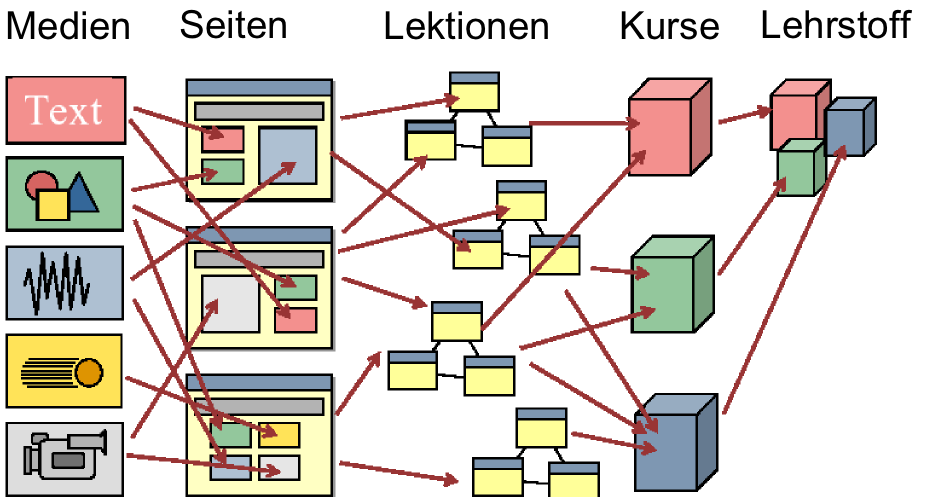
This extremely confusing graphic is being Sponsored by the Office of the Under Secretary of Defense for Personnel and Readiness (OUSD P&R)

Thursday, April 06, 2006

PC World Installs Windows XP on a 20-Inch iMac With Boot Camp

Somethun' jes don lookie raat wit dat Apple ...
This didn't take nearly as long as I expected! Before you run out and start slapping Windows onto your Mac - make sure you do your homework and practice safe booting. If anyone reading this get this running successfully and installs and runs some access tech - please drop us a line. Thankee Kindly!

Wednesday, April 05, 2006

Give your TTS a workout!


A few years ago when Kurzweil first brought out Jennifer, I had the opportunity to run her through the paces using a poem titled "English is Tough Stuff". Since then I have used this poem as a benchmark for every TTS, Screenreader, and DAISY production program that crosses my desk. I also used it when interviewing work-study students for books-on-tape reader jobs. This page, courtesy of the simplified spelling society, is chock full of poems showing the absurdities of English spelling and guaranteed to get Microsoft Mary to slap you upside yo head!